 Zenolab.app

Pixel Habit: Habit Tracker
Habit Tracker – GitHub-Style Streak Grids. Build habits like code contributions.
At a glance.

Why Pixel Habit: Habit Tracker
Built for everyday use.
Contribution Graph
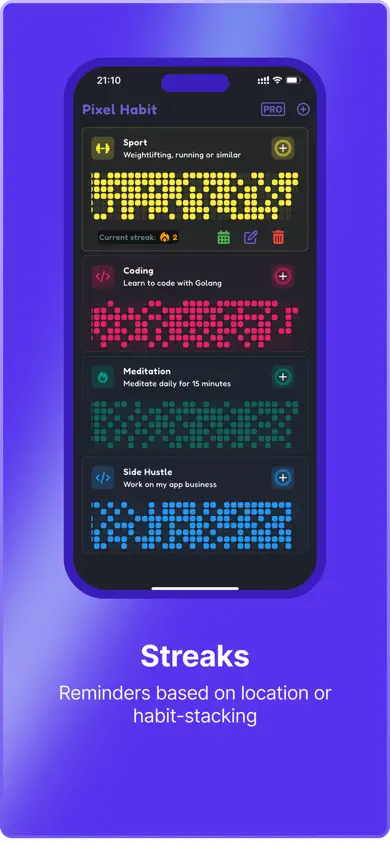
A GitHub-style heatmap displays your habit completion over the entire year, making consistency visually rewarding.
Streak Counter
Track your current and longest streaks for each habit with automatic streak detection and milestone celebrations.
Minimal Interface
A distraction-free design lets you add and complete habits in seconds with just a single tap.
Multiple Habit Colors
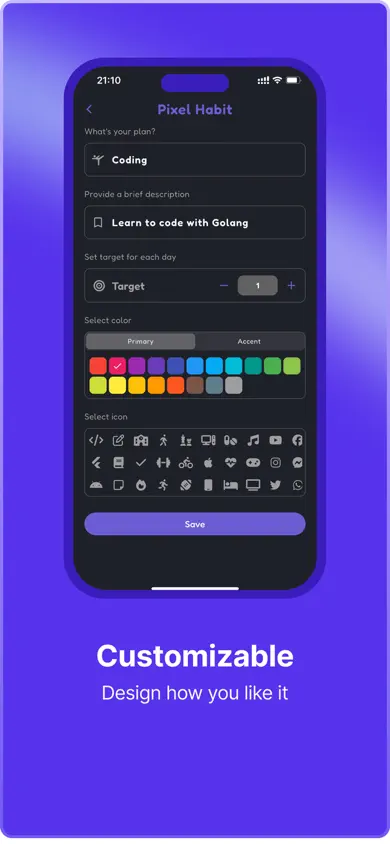
Assign unique colors to each habit so your contribution graph becomes a personalized mosaic of your routines.
Yearly Overview
Zoom out to see your entire year of habit data at a glance, identifying seasonal patterns and long-term trends.
About
About Pixel Habit: Habit Tracker.
Pixel Habit turns daily discipline into a visual masterpiece. Track habits like GitHub streaks with pixel-perfect grid charts — watch your progress bloom in colorful tiles where every filled square is a day you crushed your goal.
Build habits fast: name, describe, and customize each one in seconds, with unique colors and icons to match your vibe. The visual dashboard motivates you with a growing grid of success, and tap-to-edit makes corrections effortless. Your consistency becomes a personalized mosaic of your routines.
No cloud, no sign-ins — your data stays 100% on-device and private. It is habit tracking stripped to its most satisfying form: just you, your habits, and the pixels.
Information
- Developer
- ZenoLab
- Version
- v1.x
- Category
- Lifestyle
- Platforms
- iOS
- Status
- STABLE
- Store
- App Store
Answers
Frequently asked questions.
What is a contribution graph?
A contribution graph is a grid where each cell represents one day. The cell color intensity shows how many habits you completed that day. It is inspired by the GitHub activity graph used by software developers.
How many habits can I track?
You can track as many habits as you want. Each habit gets its own color on the contribution graph, so you can distinguish between them at a glance.
Can I backfill missed days?
Yes. If you forgot to mark a habit as complete, you can tap on any past day in the grid to update it retroactively.
Is Pixel Habit free?
Pixel Habit is free to download with core habit tracking features. Additional customization options and themes are available through a one-time purchase.


